Homer
Homer watches your agents, so you don't have to.
Run Claude Code, Codex, opencode, LangGraph and plain old shell scripts as background jobs —
with queues, locks, spend caps, and a human on call when it matters.



Show me · Quick start · Feature atlas · Documentation
Why Homer?
Starting a coding agent is one command. Running fifty of them unattended is a different job: someone has to queue them, stop two from editing the same checkout, notice when one burns through the budget, answer its question at 2 a.m., and tell you afterwards what happened.
Homer is that someone. You describe an agent — a list of steps in an agent.yaml — and trigger it over HTTP, on a cron schedule, or as an MCP tool. Homer runs it in the background in its own workspace, keeps the logs, artifacts and costs, and traces every step with OpenTelemetry.
(The name stands for Hub for Orchestrating Managed Execution Runs. The red eye in the logo is keeping an eye on things. Nothing more sinister, we promise.)
Show me
An agent that hunts down a flaky test, lets Claude fix it, and asks before pushing:
name: fix-flaky-test
description: Reproduces a flaky test, lets Claude fix it, asks before pushing
inputs:
  - paramName: test
    envName: TEST
    type: string
    required: true
lockStrategy:
  key: "repo"           # one run at a time touches the checkout
  onCollision: WAIT
commands:
  - !<script>
    content: ./gradlew test --tests "$TEST" --rerun 2>&1 | tail -50
    continueIfFail: true
    resultEnvParam:
      - src: STD_OUT
        envName: FAILURE_LOG
  - !<claude>
    prompt: !<prompt>
      prompt: |
        {{TEST}} is flaky. Its last run printed:
        {{FAILURE_LOG}}
        Find the cause and fix it. Commit, but don't push.
    timeout: 1800          # seconds
    options:
      model: sonnet
      maxBudgetUsd: 2.0    # Claude stops here, not your card
  - !<script>
    timeout: 86400         # waits for a human, so give it a day
    content: |
      answer=$(homer-ask ask-and-wait "Push the fix for **$TEST**?" --option push --option drop)
      if [ "$answer" = push ]; then git push; fi
Start it and walk away:
curl -X POST -H "Authorization: Bearer $TOKEN" \
  "http://localhost:8080/api/v1/agent/fix-flaky-test?test=OrderServiceTest"
# {"processId": 42}
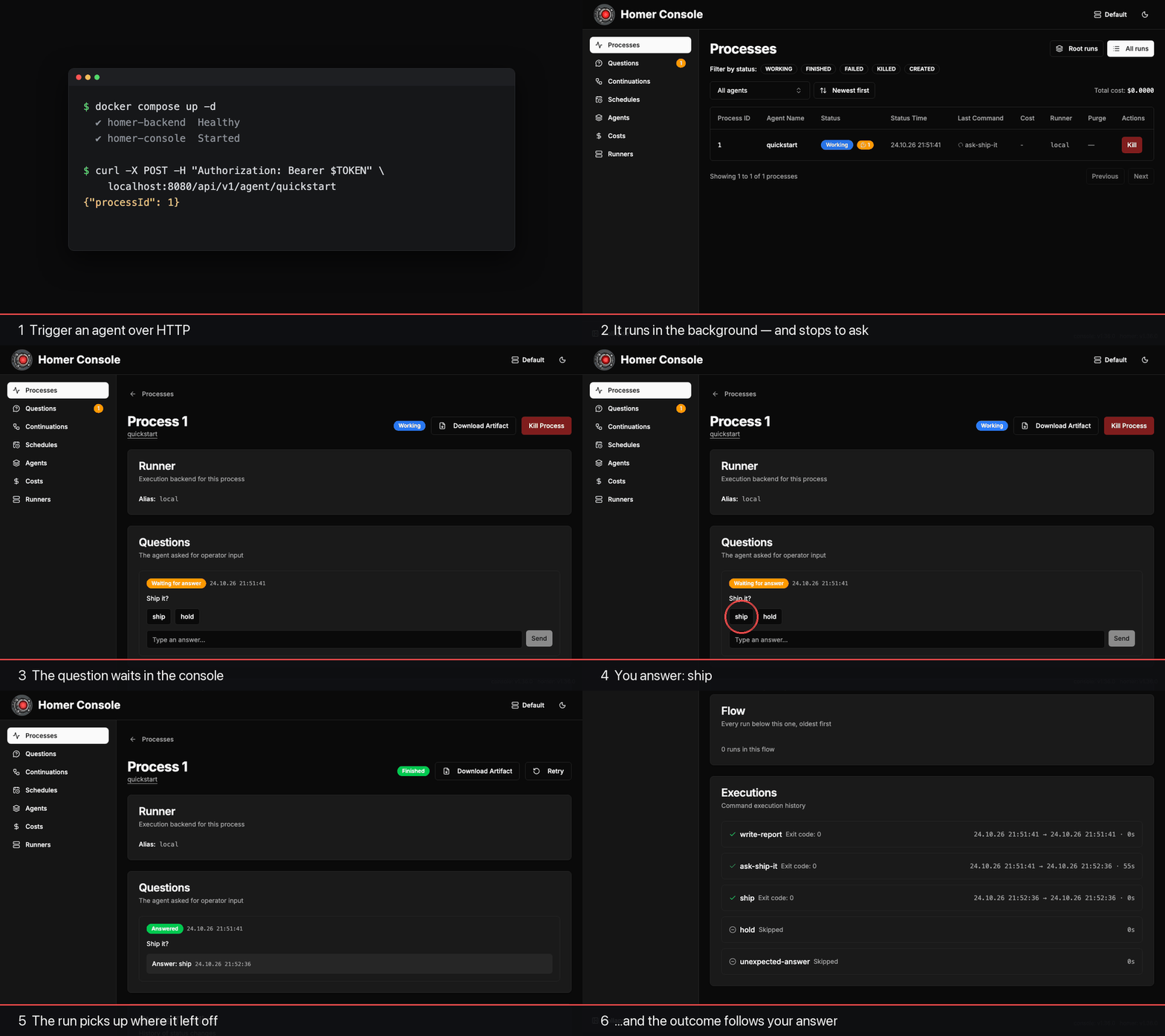
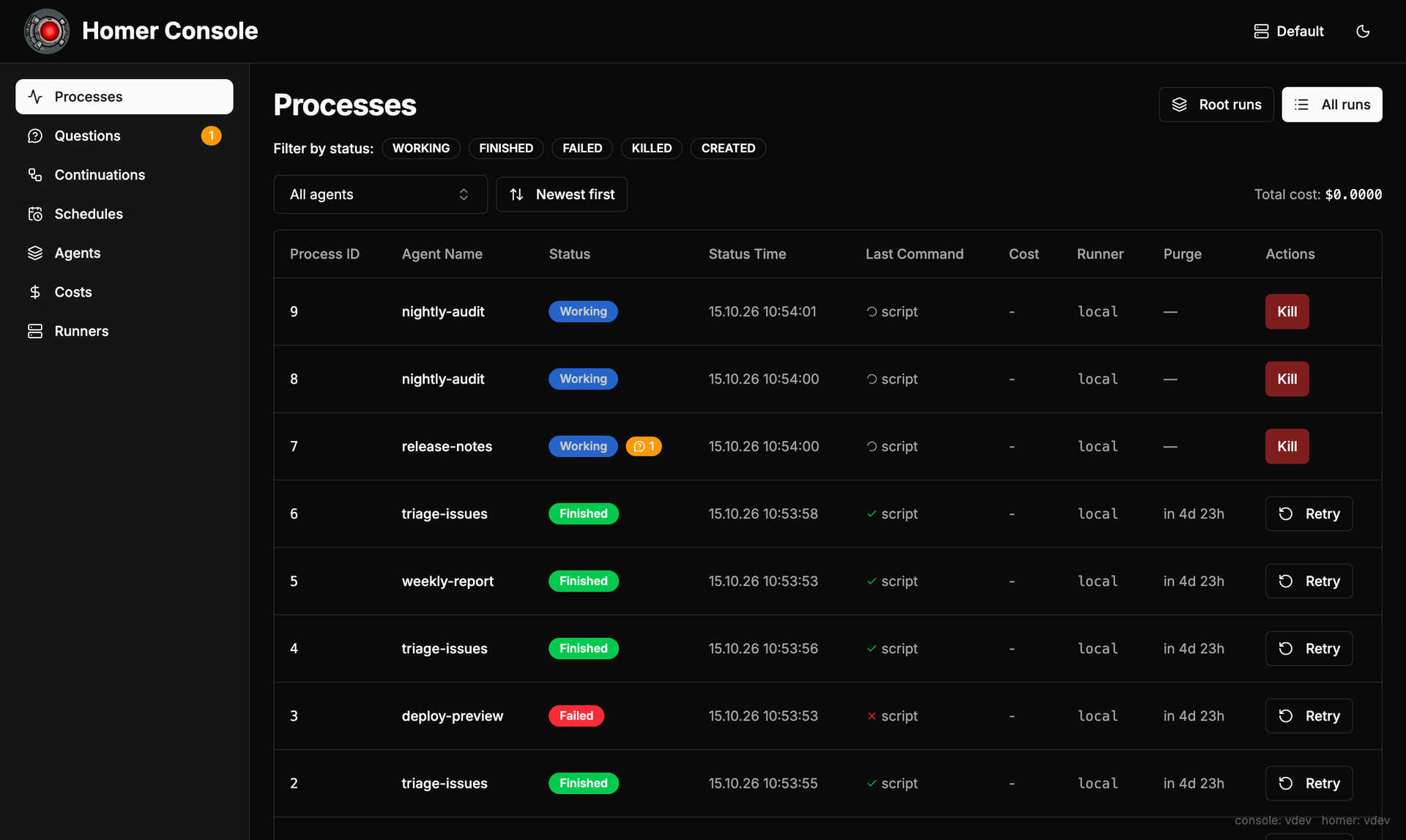
Then watch it in the web console: live logs, every run's status, what each one cost, and the question waiting for your answer.
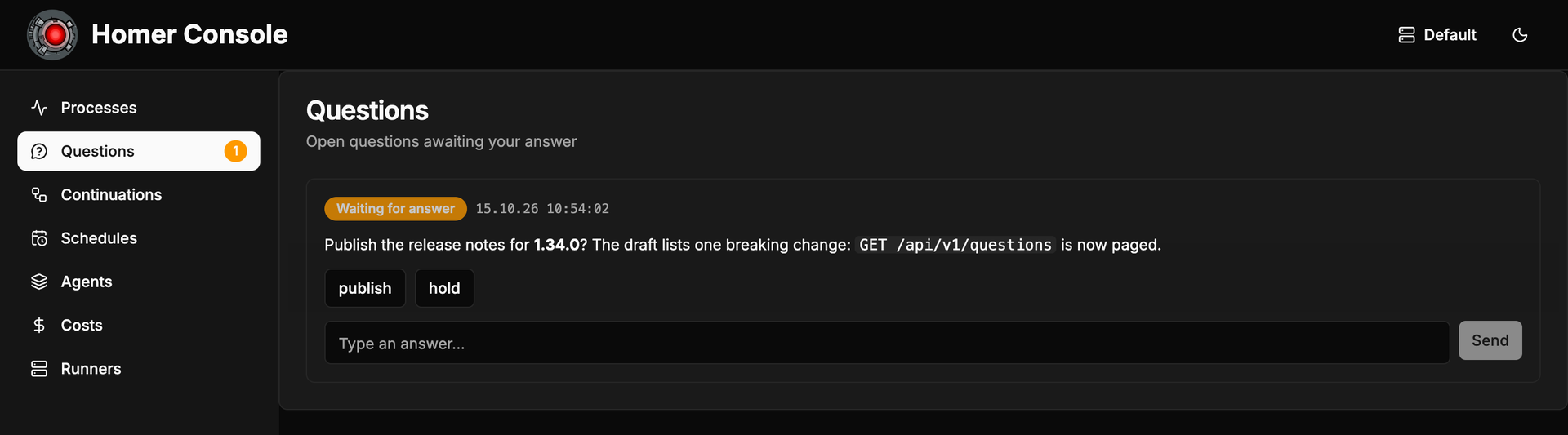
When an agent needs a human, the question lands in the console's inbox. Click an answer, and the run picks up where it left off:
Durable workflows with LangGraph
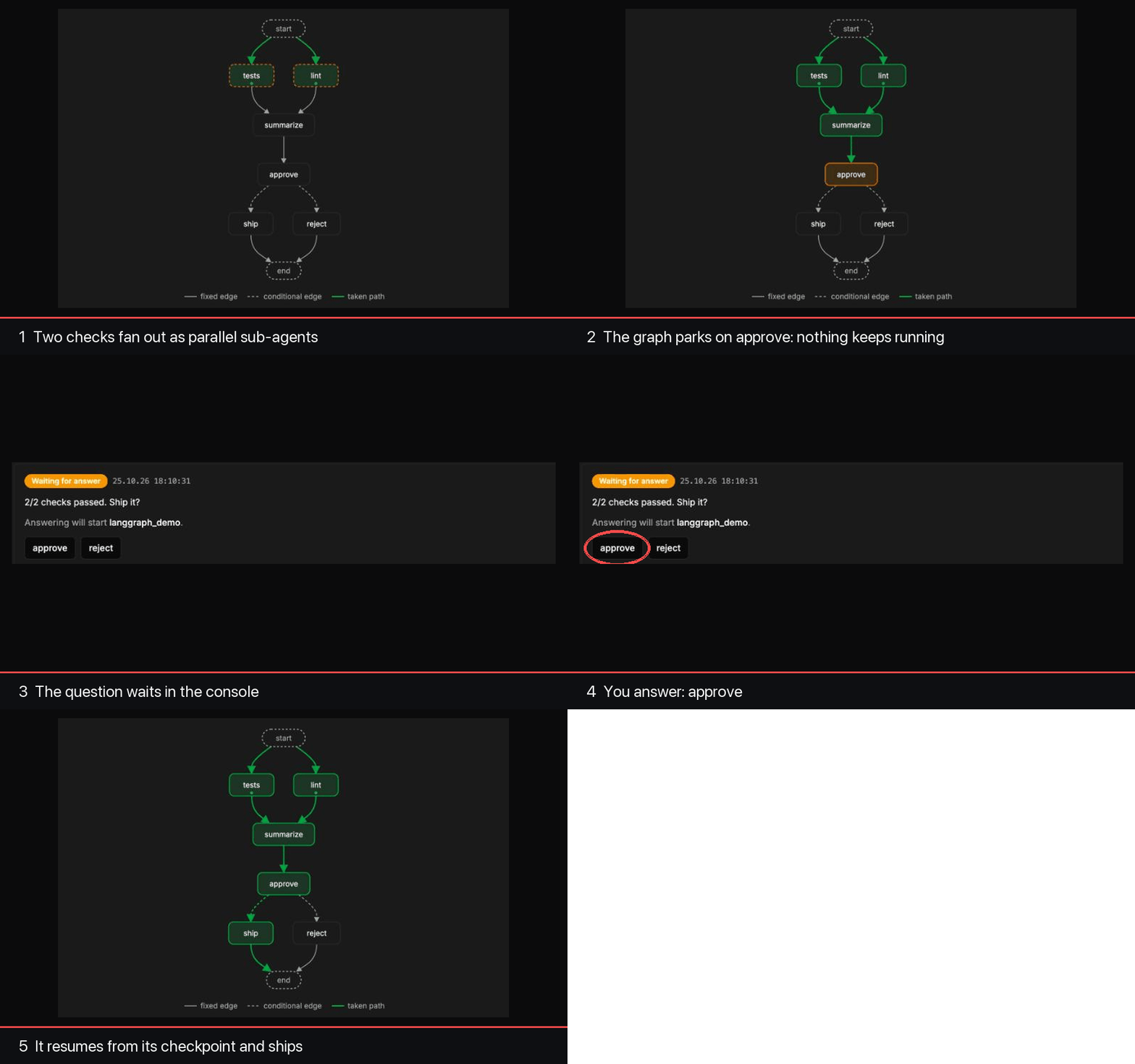
When a list of steps isn't enough, write the flow as a LangGraph graph and run it with !<langgraph>. Homer checkpoints every step, runs branches as sub-agents in parallel, and parks the graph on a human question without keeping anything running — when the answer arrives, the graph resumes from its checkpoint, right where it stopped.
def tests(state):    # a Homer sub-agent, running in parallel with lint
    return {"tests": homer_fanout("langgraph_demo_check", params={"check": "tests"},
                                  result_jsonpath="$.ok", group="checks")}

def approve(state):  # parks the graph until the operator answers
    return {"decision": homer_interrupt(f"{state['summary']}. Ship it?",
                                        options=["approve", "reject"])}
The console draws the graph and shows how far each run got. Green is the path taken — the two checks ran side by side as sub-agents — and orange is where the run waits for the operator. This is the bundled langgraph_demo agent (example/agents/langgraph_demo), which you can run yourself after the Quick start:
What's in the box
- Async HTTP API — a run call returns a process id at once; follow the run through status, SSE streams, or the web console.
- Eight command types —
!<cmd>,!<script>,!<claude>,!<codex>,!<opencode>(opencode CLI execution),!<agent>(nested agent),!<langgraph>(durable Python workflows with resume), and!<runnerCmd>(run one step on another runner). - Data flow between steps — capture stdout, stderr or files into env vars (JSONPath, regex), template them with
{{VAR}}, and gate steps withwhen. - Runs anywhere — locally, on ssh hosts, as Kubernetes pods, or on pull-mode runners (
homer-runner), with tag-based routing and per-runner concurrency. - Guardrails — lock strategies, parallel-run caps, cooldowns, cron schedules, and LLM spend caps with a persistent cost ledger.
- Human in the loop — agents ask the operator and wait for the answer, fire a follow-up agent once it arrives, or read a message an operator sends to a running run through its per-run inbox (
homer-inbox, Claude hooks, thecheck_messagesMCP tool). - MCP server — expose opted-in agents as MCP tools.
- Auth and grants — bearer, HMAC, and password auth, with per-agent
run/read/control/edit/debuggrants. - Observability — OpenTelemetry traces, Langfuse integration, and Langfuse-managed prompts.
- Web console — processes, live logs, questions inbox, per-run messages, costs, an agent editor, agent-group tabs, and a banner while maintenance mode holds the server still.
How it fits together

When Homer is the right tool
Reach for Homer when you run coding agents, scripts or LangGraph workflows on demand or on a schedule, and they need queueing, locking, spend limits, a human answer mid-run, durable resume, or one API in front of several kinds of machines.
Reach for something else when:
- one cron line on one box does the job — keep it, cron is great (see Why not …? below);
- you need data pipelines with backfills and DAGs — Airflow or Dagster (see Why not …? below);
- you want a sandbox that contains hostile code on its own — Homer leaves isolation to the runner you send a run to (see below).
Why not …?
Homer is not the only way to run something unattended. What each of the usual alternatives does better, and what Homer adds when the thing running is a coding agent:
| Instead of | What it does better | What Homer adds |
|---|---|---|
| Temporal, or another durable-execution engine | Durable workflows as a programming model: activities, timers, signals, replayable history. | Agents rather than services: a workspace and lock key per run, a cap that refuses a run before it spends, questions a run parks on. Not a sandbox — isolation is the runner's. |
| Airflow / Dagster / Prefect | Data pipelines: backfills, partitioned assets, lineage, an operator for every cloud. | Steps that are LLM calls: per-step budgets, the live Claude conversation and its cost, human answers mid-run, an OpenTelemetry span per command. |
| n8n / Zapier-style automation | Connectors and a visual editor: hundreds of SaaS integrations, no code. | Unattended agent runs: a workspace and lock per run, a cap checked before the run starts, runners on Kubernetes, ssh or a pull-mode host. Not a sandbox — isolation is the runner's. |
| GitHub Actions / GitLab CI | CI is where the code and its secrets already are: hosted runners, per-job isolation, a marketplace. | Runs not tied to a push: questions a run waits days for, locks across runs, LLM spend caps not job minutes, the live conversation. Not a sandbox — the isolation is the runner's. |
| LangGraph on its own, or LangGraph Platform | The graph is the program: state machine, checkpointing and streaming, no orchestrator between. | The operations around it: a graph that parks on a question and resumes from its checkpoint, a workspace and locks for the run, traces of every step. |
| cron + shell scripts | Nothing to install, nothing to learn: a crontab line and a script are already on the box. | What a script cannot do: one run at a time per checkout, a cap that stops the bill first, a question the run waits on, somewhere else to run it, what it cost and did. |
Quick start
Requires Docker with Compose.
cp .env.example .env

# Generate a strong admin API token (required — startup fails if it is empty)
echo "HOMER_ADMIN_TOKEN=$(openssl rand -hex 24)" >> .env

docker compose up -d
# Console: http://localhost:3000   API: http://localhost:8080 (both bound to 127.0.0.1)
The stack pulls the published release images (ghcr.io/livesport/homer/homer-app and ghcr.io/livesport/homer/homer-console), so nothing is built locally and no JDK or Maven Central access is needed. The first start downloads under 1 GB of images and needs under 3 GB of disk; the largest part is the Claude Code, Codex and opencode CLIs bundled in homer-app. HOMER_VERSION in .env selects the release and defaults to the pinned current one; a deployment whose agents all run on pull runners can pull the slim homer-app:<version>-slim server image instead, which leaves the agent CLIs out (ADR-0094). To build from source instead, add the build overlay:
docker compose -f docker-compose.yml -f docker-compose.build.yml up -dTo verify the images before the first pull — every release image is a multi-arch index (linux/amd64 and linux/arm64), signed with cosign and carrying SLSA provenance and a CycloneDX SBOM (ADR-0086) — run:
version=1.43.0   # keep in step with HOMER_VERSION in .env
for image in ghcr.io/livesport/homer/homer-app ghcr.io/livesport/homer/homer-console; do
  # Resolve the digest first and verify that digest: if the tag were re-pointed
  # after the verify, the digest you pin would no longer be the one you checked.
  digest=$(docker buildx imagetools inspect "$image:$version" --format '{{.Manifest.Digest}}')
  echo "$image@$digest"
  cosign verify "$image@$digest" \
    --certificate-identity-regexp '^https://github\.com/livesport/homer/\.github/workflows/release\.yml@refs/tags/[0-9]+\.[0-9]+\.[0-9]+$' \
    --certificate-oidc-issuer https://token.actions.githubusercontent.com
  gh attestation verify "oci://$image@$digest" --repo livesport/homer \
    --signer-workflow livesport/homer/.github/workflows/release.yml \
    --predicate-type https://slsa.dev/provenance/v1
done
Then pin what you verified by digest, so a later re-tag cannot change what you run: the loop above prints each image's image@sha256:<digest> reference, and a local docker-compose.override.yml (loaded automatically by the plain docker compose up -d above) sets image: to it — for the backend, image: ghcr.io/livesport/homer/homer-app@sha256:<digest>. The full recipe, SBOM attestation included, is in DOCKER.md § Verifying a published image.
Trigger the bundled quickstart agent — it is built only from !<script> steps, so it needs no LLM credentials:
TOKEN=$(grep '^HOMER_ADMIN_TOKEN=.' .env | tail -n 1 | cut -d= -f2-)

curl -X POST -H "Authorization: Bearer $TOKEN" \
  "http://localhost:8080/api/v1/agent/quickstart"
# {"processId": 1}
The run starts in the background and stops on a question. Sign in to the console first: open http://localhost:3000/login?mode=bearer, choose Token and paste the HOMER_ADMIN_TOKEN value from .env (echo "$TOKEN"). Then open http://localhost:3000/processes/1 to watch its live logs, and answer ship in the Questions inbox (http://localhost:3000/questions). The run resumes, prints the artifact it wrote, and finishes:
curl -H "Authorization: Bearer $TOKEN" "http://localhost:8080/api/v1/status/1"
# ... "status": "FINISHED"
Answer hold on a later run instead and that step exits non-zero, so the run ends FAILED — the outcome follows your answer.
The walkthrough runs on the built-in local runner, which is what the compose stack defaults to. The question flow is not local-only: Homer materializes the .homer/bin helpers into every run's workspace and uploads them with it, so an ssh, kubernetes or external runner gets them too — such a target only needs curl and awk plus a reachable homerApiUrl, from which the runner injects HMR_API_URL (see app/AGENT.md § Asking the operator questions).
Next: a durable LangGraph workflow
The bundled langgraph_demo agent is a small LangGraph graph, and it needs no LLM credentials either. It fans out two checks as parallel sub-agents, summarizes them, and parks on an approval question:
curl -X POST -H "Authorization: Bearer $TOKEN" \
  "http://localhost:8080/api/v1/agent/langgraph_demo"
Open the run in the console's Processes list and expand its langgraph step under Executions to see the graph: the checks are green, approve is orange. The run itself already shows Finished — a parked graph keeps no process running. Answer approve in the Questions inbox, and Homer starts a new run that resumes the graph from its checkpoint and takes the ship path.
Next: add Claude
The hello example agent (example/agents/hello_world/agent.json) ends in a !<claude> step, so it needs Claude credentials in the command environment — for the compose stack, put them in globalEnv in example/config/config.json (app/SERVER.md § Global Environment Variables), e.g. "ANTHROPIC_API_KEY": "sk-ant-…":
curl -X POST -H "Authorization: Bearer $TOKEN" \
  "http://localhost:8080/api/v1/agent/hello?project_id=demo"
To run without Docker, build and start the server JAR as described in app/README.md. Use DOCKER.md for dev and prod compose overrides, volumes, and image build options.
Security model
Homer itself is not a sandbox: on the built-in local runner an agent runs with the full access of the OS user Homer runs as. Isolation comes from where a run executes, and each agent picks that with runner:. On the kubernetes runner every run gets a pod of its own, bounded by its image, resources and network policy. A homer-runner instance runs agents in a container or VM away from Homer's host, as the runner's own unprivileged user; on Linux the runner marks itself non-dumpable, so a run cannot read its token (ADR-0078). Runs on one instance share that machine and that user, so give untrusted work an instance of its own. Either way, treat what an agent runs, and anything it writes, as untrusted, and give it only the files, network and credentials it needs. The case study Runs that hold no credentials shows runs that hold no token at all.
Homer does enforce boundaries between callers — every caller authenticates, grants decide which agents they may run, read, control, edit or debug, and a run is visible only to its owner, admins, and read grant holders. The Docker stack binds to 127.0.0.1; before anyone else can reach it, hand out narrow tokens and put a TLS-terminating reverse proxy in front. Details: app/SERVER.md § Authentication Configuration, the threat model, and SECURITY.md to report a vulnerability.
Documentation
| Topic | Document |
|---|---|
| Everything below as one searchable site, per release | livesport.github.io/homer |
| Guided tour of every feature | Feature atlas (source: docs/homer-feature-atlas.html) |
| Agent definition format | app/AGENT.md |
| Server configuration | app/SERVER.md |
| HTTP API, MCP server, building the backend | app/README.md |
| Docker deployment | DOCKER.md |
| Web console | console/README.md |
Debugging agents locally (agentdebug) | DEBUG.md |
| LangGraph Python runtime | clients/python/homer_langgraph/README.md |
| How Homer is run in practice | Case studies |
| Architecture decisions | docs/adr/ |
| Release notes | CHANGELOG.md |
Editor autocomplete for agent.yaml and config.yaml
JSON Schemas for the config file and agent definitions live in app/schemas/:
app/schemas/homer-config.schema.json— forconfig.json/config.yamlapp/schemas/homer-agent.schema.json— foragent.json/agent.yaml
VS Code
Install the YAML extension (Red Hat) and add to .vscode/settings.json:
{
  "json.schemas": [
    { "fileMatch": ["**/config*.json"], "url": "./app/schemas/homer-config.schema.json" },
    { "fileMatch": ["**/agent.json"],   "url": "./app/schemas/homer-agent.schema.json" }
  ],
  "yaml.schemas": {
    "./app/schemas/homer-config.schema.json": ["**/config*.yaml", "**/config*.yml"],
    "./app/schemas/homer-agent.schema.json":  ["**/agent.yaml", "**/agent.yml"]
  },
  "yaml.customTags": [
    "!<cmd> mapping", "!<script> mapping", "!<claude> mapping", "!<codex> mapping",
    "!<opencode> mapping", "!<langgraph> mapping", "!<runnerCmd> mapping", "!<agent> mapping",
    "!<pass>", "!<pass> mapping", "!<jsonPath> mapping", "!<regex> mapping",
    "!<prompt> mapping", "!<langfuse> mapping",
    "!<bearer> mapping", "!<hmac> mapping", "!<password> mapping", "!<combined> mapping",
    "!<unsecured>", "!<unsecured> mapping", "!<kubernetes> mapping", "!<ssh> mapping", "!<external> mapping", "!<key> mapping",
    "!<hostPath> mapping", "!<configMap> mapping", "!<secret> mapping", "!<pvc> mapping",
    "!<emptyDir>", "!<emptyDir> mapping"
  ]
}
You need yaml.customTags because kaml uses YAML tags to pick sealed-class variants (e.g. !<script> selects Command.Script). If the tags aren't registered, the YAML extension reports "unknown tag" errors.
Inline directive
Alternatively, add a # yaml-language-server: directive at the top of any YAML file:
# yaml-language-server: $schema=../../../app/schemas/homer-agent.schema.json
name: hello
# ...
JetBrains IDEs
File → Settings → Languages & Frameworks → Schemas and DTDs → JSON Schema Mappings, then add two mappings pointing at the files under app/schemas/.
Authoring agents with Claude Code
This repo doubles as a Claude Code plugin marketplace. The homer-authoring plugin bundles a skill that teaches Claude the agent format plus copies of both JSON schemas and AGENT.md for editor autocomplete. Install it from a Claude Code session:
/plugin marketplace add https://github.com/livesport/homer.git
/plugin install homer-authoring@homer
The .git suffix makes Claude Code clone the repo instead of attempting a marketplace-name lookup. An SSH remote (git@github.com:livesport/homer.git) works too. Run /plugin marketplace update homer to refresh after the format changes (the bundled skill and schema ride in the same release as the format).
Repository layout
app/— backend (Kotlin/Ktor), its Dockerfile, JSON schemas, and theagentdebugCLIconsole/— web console (Next.js) and its Dockerfileclients/— Pythonhomer_langgraphruntime behind!<langgraph>example/— example config and agents for the compose stack, plus example console pluginsdocs/— ADRs and the feature atlassite/— VitePress documentation site:.vitepress/config and theme,pages/, and thescripts/that assemble the published docs and schemastools/— repository tooling: the PR policy check (pr-policy/) and the quality gates (quality/)plugins/,.claude-plugin/— thehomer-authoringClaude Code plugin and its marketplace manifest
Contributing
Contributions are welcome! CONTRIBUTING.md covers the toolchain (JDK 25 for the backend, Node for the console), the verify commands, and the commit, changelog and ADR conventions. Questions and help belong in GitHub Discussions. Everyone taking part follows the Code of Conduct. The people behind Homer are in CONTRIBUTORS.md.
License
Licensed under the Apache License, Version 2.0. Copyright 2026 Livesport s.r.o.
Homer redistributes third-party code in its JARs and Docker images: NOTICE carries the attributions those dependencies require, and THIRD-PARTY-LICENSES.md inventories every redistributed package with its license.